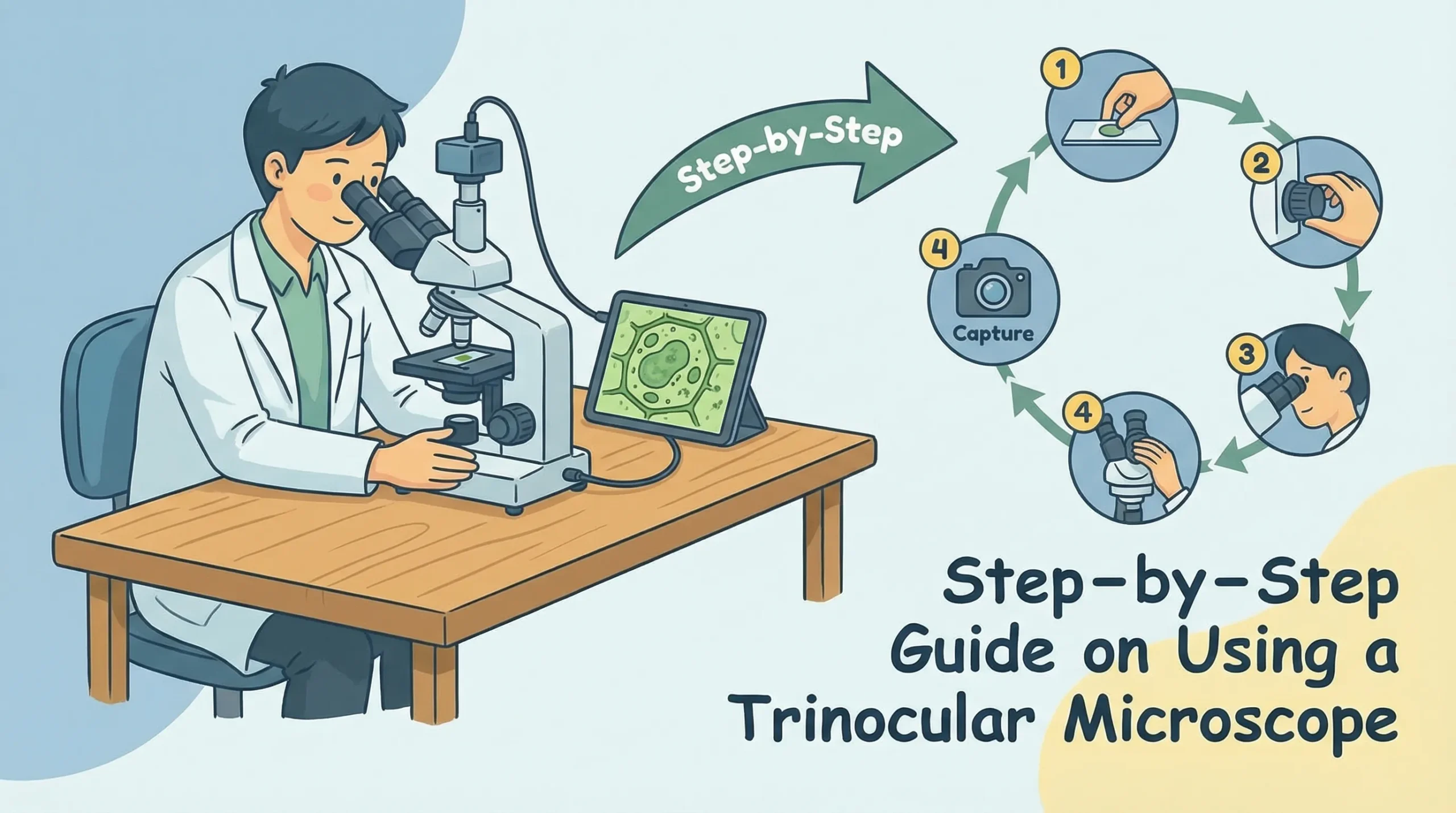
A trinocular microscope is a specialized optical device designed for detailed observation and imaging. It features three viewing ports—two for direct observation and one for connecting a camera. This unique setup makes it ideal for capturing high-resolution images, which are essential in fields like research, healthcare, and education. Mastering the use of a trinocular microscope is essential for unlocking its full potential, especially in diagnostic labs, academic settings, and research facilities where they are commonly employed to boost both precision and productivity.
Advancements in microscopy technology have made these instruments more accessible and user-friendly, meeting the growing demand for accurate analysis in science and medicine. Learning to use a trinocular microscope effectively is crucial for achieving the best results, whether you’re examining tissue samples or preparing educational demonstrations.
How to Use Trinocular Microscope: Setting Up
Unpacking and Assembling the Microscope
When you first receive your trinocular microscope, unpack it carefully to avoid damaging its delicate components. Start by removing the main body, eyepieces, objectives, and other accessories from the packaging.
Place each item on a clean, flat surface to keep them organized.
Follow the assembly instructions provided in the user manual. Begin by attaching the eyepieces to the binocular tubes. Ensure they are securely fitted but avoid applying excessive force. Next, install the objectives onto the revolving nosepiece.
Rotate the nosepiece gently to confirm that each objective clicks into place.
Here’s a table summarizing key components and specifications to check during assembly:
|
Component |
Specification |
|---|---|
|
Optical system |
Greenough |
|
Magnification range |
0.75X–5X, 7.5X–50X |
|
Zoom ratio |
1:6.7 |
|
Eyepiece |
N-WF, high eye-point 10X, adjustable |
|
Interpupillary adjustment |
48mm–75mm |
|
Working distance |
110mm |
|
Weight |
6.2 kg |
|
Illumination options |
Various optional sources available |
Handle each component with care to prevent scratches or misalignment. Avoid touching the lenses directly, as fingerprints can interfere with image quality.
Positioning the Microscope in Your Workspace
Proper placement of your trinocular microscope is essential for comfort and efficiency. Choose a sturdy table with enough space to accommodate the microscope and its accessories. Ensure the surface is level to prevent vibrations during use.
Follow these steps to optimize your workspace ergonomically:
-
Adjust the table and chair height to maintain an upright posture.
-
Position the binocular tubes at eye level to reduce neck strain.
-
Place the microscope so your arms can rest comfortably while operating the controls.
Using ergonomic accessories, such as adjustable chairs and wrist supports, can further enhance comfort. These adjustments help prevent muscle strain and allow you to focus on your observations without distraction.
Initial Inspection and Handling Tips
Before using the microscope, inspect it thoroughly to ensure all components are in good condition. Check the lenses for dust or smudges and clean them with a microfiber cloth if necessary. Verify that the objectives are securely attached and the stage moves smoothly.
Here’s a table highlighting ergonomic features that improve handling:
|
Ergonomic Feature |
Impact on Operator |
Description |
|---|---|---|
|
Low positioned controls |
Reduces hand movement |
Controls are close to the operator for easy access |
|
Adjustable eyepiece tubes |
Enhances comfort |
Allows optimal viewing angle, reducing fatigue |
|
Custom wafer holders |
Improves efficiency |
Facilitates quick adjustments and precise inspections |
|
Coarse/fine movement control |
Minimizes effort |
Enables quick navigation and detailed focus with minimal strain |
Always use both hands when moving the microscope to avoid accidental drops. Keep the microscope covered when not in use to protect it from dust and debris. Regular inspections and careful handling will extend its lifespan and ensure consistent performance.
Sample Preparation Before Using the Microscope
Proper sample preparation before using your trinocular microscope is recommended for achieving clear and accurate observations. This process ensures that your specimens are well-prepared, free of contaminants, and ready for detailed examination.
Below, you’ll find step-by-step guidance on preparing slides, creating wet mounts, and using staining techniques to enhance visibility.
Preparing Slides for Observation
Preparing slides correctly is the foundation of effective microscopy. Follow these steps to ensure your slides are ready for observation:
-
Select a clean glass slide and cover slip. Any dust or residue can interfere with image clarity.
-
Place a small sample of your specimen in the center of the slide. For liquid samples, mix thoroughly to ensure uniformity.
-
Use an appropriate dilution to prevent overlapping cells. This step may require trial and error to achieve the right concentration.
-
Cover the specimen with a cover slip, ensuring no air bubbles are trapped.
-
Begin your observation at low magnification with minimal illumination. Gradually increase magnification as needed.
For specialized applications, such as counting cells, you can use tools like a hemocytometer. This device features marked chambers of known volume, allowing you to calculate cell concentrations accurately. It’s commonly used for blood, sperm, or yeast analysis.
Tip: Always handle slides with care to avoid smudges or scratches. Use gloves to prevent contamination and ensure consistent results.
Making a Wet Mount
A wet mount is ideal for observing live specimens or liquid samples. This technique keeps your sample hydrated and preserves its natural state during observation. Here’s how you can create a wet mount:
-
Place a drop of liquid sample (e.g., pond water or a cell suspension) in the center of a clean slide.
-
Gently lower a cover slip over the drop at an angle to minimize air bubbles.
-
If the sample is too thick, dilute it with a drop of distilled water.
-
Seal the edges of the cover slip with clear nail polish or petroleum jelly to prevent evaporation during extended observations.
This method works well for observing microorganisms, such as protozoa or algae, in their natural environment. It also allows you to study dynamic processes like cell movement or division.
Staining Techniques for Enhanced Visibility
Staining enhances the contrast and visibility of your specimens, especially for transparent or low-contrast samples. Different stains highlight specific structures, making it easier to identify details. Follow these general steps for staining:
-
Prepare your slide with the specimen as described earlier.
-
Apply a drop of stain (e.g., methylene blue, iodine, or crystal violet) to the specimen.
-
Allow the stain to sit for a few seconds to a minute, depending on the stain type.
-
Rinse off excess stain with distilled water, if required, and gently blot the slide dry with filter paper.
-
Place a cover slip over the stained specimen and observe under the microscope.
For plant samples, you can use a simple technique involving Scotch tape. Press the adhesive side of the tape onto a leaf to create an impression. Stain the tape with lactophenol-aniline blue and mount it on a slide with a water-soluble medium. This method reveals intricate details of the leaf structure.
🔖 Pro Tip: Use Köhler illumination to enhance the quality of your stained samples. Proper alignment of the optical components ensures uniform brightness and reduces glare, improving overall image clarity.
Adjusting the Trinocular Microscope
Focusing and Adjusting the Eyepieces
Proper eyepiece adjustments are essential for clear and consistent imaging. Begin by setting one eyepiece tube to the 0-degree position. Use the focusing knob to bring the image into sharp focus in this eyepiece. Next, adjust the second eyepiece tube without altering the focusing knob until both images appear equally clear.
For eyepieces without a vision adjustment mechanism, align the vision between your eyes using the adjustable eyepiece.
To optimize your viewing experience, adjust the eyepoint height to match your vision. Most trinocular microscopes allow diopter adjustments ranging from plus or minus 5 degrees, with a maximum differential of 10 degrees between eyepieces. Use coarse focus for quick adjustments and fine focus for precise clarity.
Fine focus adjustments can achieve a minimum read value of 1 micron, ensuring detailed observations.
Tip: Once the eyepieces are properly calibrated, you won’t need frequent adjustments. This ensures consistent clarity during extended use.
Setting the Diaphragm and Light Source
The diaphragm and light source play a crucial role in optimizing image quality. Start by adjusting the diaphragm to control the amount of light passing through the sample. A smaller aperture increases contrast, while a larger aperture enhances brightness.
Experiment with different settings to find the balance that works best for your specimen.
Position the light source to illuminate the sample evenly. Many trinocular microscopes feature adjustable LED or halogen lights. Use the intensity control to fine-tune the brightness. For advanced applications, Köhler illumination provides uniform lighting and reduces glare, improving overall image clarity.
Aligning the Trinocular Head for Image Capture
Aligning the trinocular head ensures high-quality image capture. Begin by mounting the camera securely onto the trinocular port. Adjust the camera settings, such as resolution and exposure, to match your imaging needs.
Ensure the trinocular head is aligned with the optical path to enable simultaneous viewing and capturing.
For stereo vision imaging, consider using two cameras to capture optical sectioning images from different angles. This technique improves clarity and compensates for misalignments or cyclotorsion movements.
Proper alignment and calibration of the trinocular head are essential for collaborative research and teaching, as they ensure reproducible results.
Capturing Images with a Trinocular Fluorescent Microscope
Mounting a Camera on the Trinocular Port
To capture images with a trinocular fluorescent microscope, you first need to mount a camera on the trinocular port. Begin by selecting a camera compatible with your microscope, such as a DSLR, mirrorless, or scientific camera. Use an adapter designed for your camera model to ensure proper alignment.
Secure the camera firmly onto the trinocular port to prevent movement during imaging.
Adjust the focus and alignment to avoid vignetting, which occurs when the edges of your image appear dark or blurry. If your camera has a smaller sensor, adjust the magnification to match its field of view. Some adapters include optical correction features, which help optimize image quality for specific applications.
Tip: Always double-check the stability of your setup before capturing images. A loose connection can lead to blurry or misaligned photos.
Adjusting Camera Settings for Optimal Results
Proper camera settings are essential for capturing clear and detailed images. Start by setting the exposure time based on your sample and light source. For fluorescent microscopy, longer exposure times often yield better results, as they allow more light to reach the sensor.
Here’s a table summarizing optimal settings for a common camera used in fluorescent microscopy:
|
Camera Type |
Exposure Time |
Field of View |
Light Source |
Filters |
|---|---|---|---|---|
|
DFC365 FX |
120 × 120 mm |
NIR LED (up to 900 nm) |
Two band-pass filters and long-pass filter |
Adjust the resolution and ISO settings to balance image clarity and noise. Use the microscope’s light intensity controls to fine-tune brightness. For best results, experiment with different combinations of settings until you achieve the desired image quality.
Tips for Capturing and Saving High-Quality Images
To ensure your images are both high-quality and useful for analysis, follow these best practices for image capture:
-
Include a scale bar in every image. Position it where it doesn’t obstruct important details.
-
Save your images in a non-compressed format like TIFF to preserve quality.
-
Back up your files regularly and use large-capacity storage devices for archival purposes.
-
Avoid overwriting original images when creating composites or edited versions.
-
Use descriptive file names that include details like the specimen’s genus, species, and a unique identifier.
Modern trinocular fluorescent microscopes come equipped with advanced features like LED illumination and customizable filter sets. These tools ensure stable imaging and allow you to capture detailed, vibrant images for research or educational purposes.
Using a trinocular microscope effectively involves mastering several key steps. You start by carefully assembling and positioning the microscope, preparing your samples with precision, and adjusting the optical components for clear observations. Capturing high-quality images and maintaining the microscope ensures consistent performance. Consider adding accessories like specialized camera adapters, advanced filters, or ergonomic stands.
These upgrades enhance functionality and improve your overall experience.
With dedication and the right tools, you can unlock the full potential of your trinocular microscope.
FAQ
What is the purpose of the trinocular port on a microscope?
The trinocular port allows you to attach a camera for capturing images or recording videos of your specimens. This feature is especially useful for documentation, research, and teaching purposes. It enables simultaneous observation and image capture without disrupting your workflow.
Can I use any camera with a trinocular microscope?
You can use most cameras, including DSLRs, mirrorless, or scientific cameras, as long as they are compatible with your microscope. Ensure you have the correct adapter for proper alignment. Compatibility depends on the microscope model and the camera’s sensor size.
What is Köhler illumination, and why is it important?
Köhler illumination is a technique that ensures even lighting across your sample. It reduces glare and enhances contrast, improving image quality. This method is essential for detailed observations and is widely used in professional microscopy applications.
Are there any safety precautions for using a trinocular microscope?
Always handle the microscope with care, using both hands when moving it. Avoid exposing it to direct sunlight or extreme temperatures. Regularly inspect the power cord and light source for damage. Use ergonomic accessories to reduce strain during extended use.